
smart_door_lock
This is an old revision of the document!
Smart Door Lock
7.1 Reset Smart Door Lock
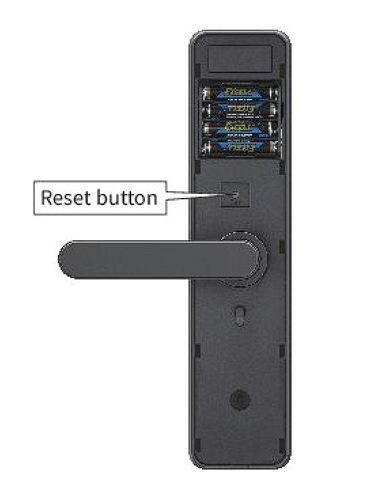
- Press “Reset” button at rear door lock body
- When you hear the voice notification, press 000 # to restore factory settings.
 |
7.2 Change Language
- *39 # Admin Password #
- Press # 1, switch to Chinese.
- Press # 2, switch to English.
7.3 Reset Smart Door Lock and Change Admin Password (If You Forgot the Current Password)
- Press “Reset” button at rear door lock body
- Once you heard notification voice, press 000 # to factory reset the door lock.
- Press * 12 #.
- Listen to the voice prompt and enter default 6-digit password 123456 #.
- Listen to the voice prompt and enter a new 6-digit password xxxxxx #.
- Re-enter the new 6-digit password to confirm: xxxxxx #.
- Voice notification confirms the password change.
7.4 Change Admin Password (If You Know the Current Password)
- Press * 12 #.
- Listen to the voice prompt and enter current 6-digit admin password: xxxxxx #.
- Listen to the voice prompt and enter a new 6-digit password: xxxxxx #.
- Re-enter the new 6-digit password to confirm: xxxxxx #.
- Voice notification confirms the password change.
7.5 Add a Fingerprint
- Press * 80 #
- Listen to the voice prompt and enter current 6-digit admin password: xxxxxx #.
- Listen to the voice prompt and swipe your fingerprint on the handle.
- Swipe again
- Swipe one more time.
- Voice notification confirms successfully fingerprint registration.
7.6 Add a Physical RFID card
- Press * 80 #.
- Listen to the voice prompt and enter current 6-digit admin password: xxxxxx #.
- Listen to voice prompt, swipe the RFID card in front of the smart lock.
- Listen to voice prompt, swipe the RFID card again.
- Voice notification confirms the successfully card registration.
7.7 Unlocking with USB Emergency Power Supply and Physical Key
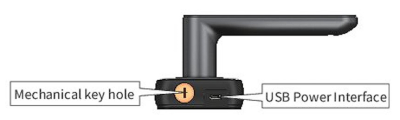
- If the battery is dead, connect a 5V power bank to the micro USB port at the bottom of the smart lock’s front panel.
- Unlock using fingerprint, PIN code, or RFID card.
- Alternatively, use the mechanical key to unlock.
 |
7.8 Advance Settings
7.9 Smart Door Lock App Control
smart_door_lock.1740120230.txt.gz · Last modified: by yong