
Table of Contents
10. Settings Snooker Table Rate
10.1. Packages settings: Setting up countdown timer to turn off lights automatically
- Key in textbox of Item, Price and Duration as well as select Once or Repeat option
- Item: Name of the package
- Price: Total price for the package
- Duration: Total duration in seconds for the package
- Once - Turn off lights automatically after countdown is finished
- Repeated - After 1st time countdown is finished, it will automatically jump to 2nd, 3rd, 4th, etc. countdown until you click “STOP” button on checkout panel to turn off lights.
- Remember to click “Add” button to add the package.
Effect:
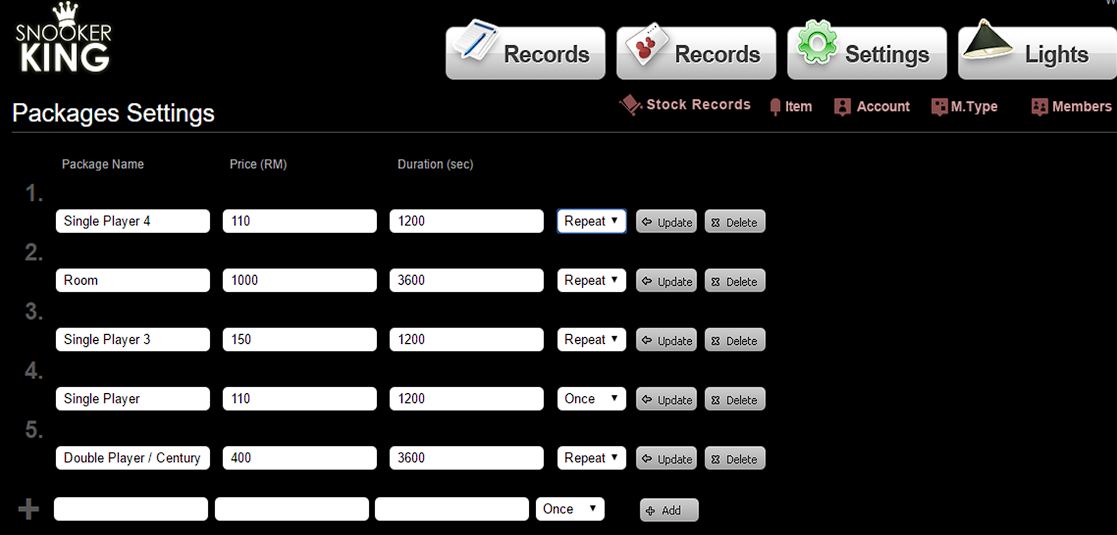 |
Sample:
- Situation 1: Single Player 4 Package
When user selects this option, customer is charged RM 110 for 20 minutes (1200 seconds). But it will start a new game after every 1200 seconds.
- Situation 2: Room Package
When user selects this option, customer is charged RM 1000 for 1 hour (3600 seconds). But it will start a new game after every 3600 seconds.
- Situation 3: Single Player 3 Package
When user selects this option, customer is charged RM 150 for 20 minutes (1200 seconds). But it will start a new game after every 1200 seconds.
- Situation 4: Single Player Package
When user selects this option, customer is charged RM 110 for 20 minutes (1200 seconds). Our system turns off lights automatically after 1200 seconds.
- Situation 5: Double Player/ Century Package
When user selects this option, customer is charged RM 400 for 1 hour (3600 seconds). But it will start a new game after every 3600 seconds.
10.2. Default Packages Settings: Setting up default package selection
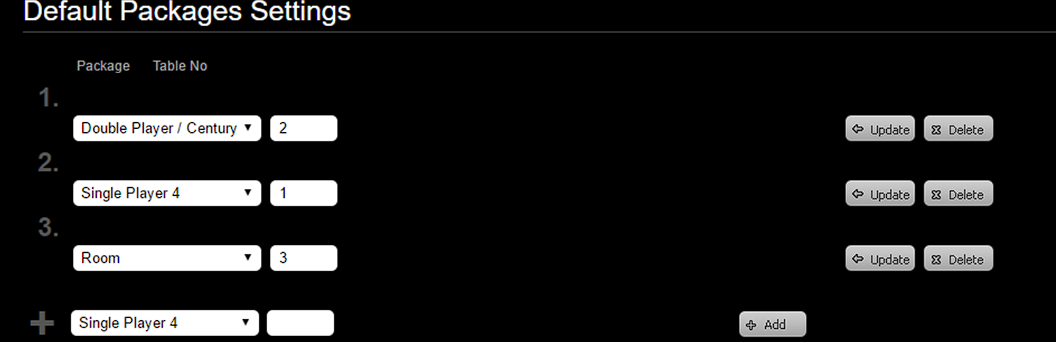
- Select package option and key in table number.
- Remember to click “Add” button to add the default package.
Effect: Back-end
 |
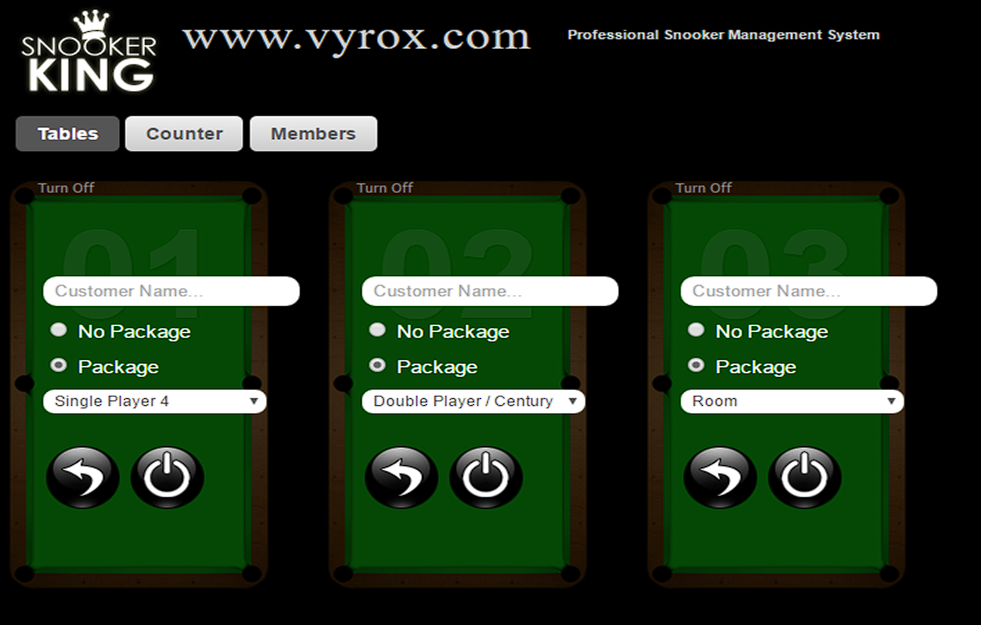
Effect: Front-end
- Package Single Player 4 is automatically selected for table 1.
- Package Double Player/Century is automatically selected for table 2.
- Package Room is automatically selected for table 3.
 |
10.3. Rate Settings: Setting up free of charge for all tables
- Key in duration (seconds) in textbox of Free of Charge Duration.
- Remember to click “Update” button to save this setting.
Effect:
- When user put 10 seconds in textbox, the charges for every game start charging after 10 seconds
Recommend to put 0 seconds.
10.4. Rate Settings: Setting up minimum charge on all tables
- Key in the rate in textbox of Minimum Charge.
- Remember to click “Update” button to save this setting.
Effect:
- When user put RM 5.00 in textbox, all games with charges less than RM 5.00 will automatically checkout as RM 5.00. Recommend to put 0 seconds.
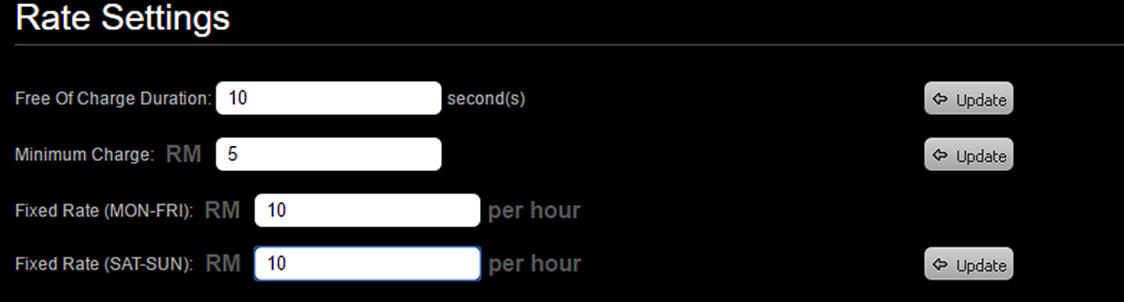
10.5. Rate Settings: Setting up fixed rate for all tables
=
- Key in rate in textbox of Fixed Rate.
- Remember to click “Update” button to save this setting.
Effect:
- When user put RM 10 in textbox, all tables will be charged as RM 10/hour
 |
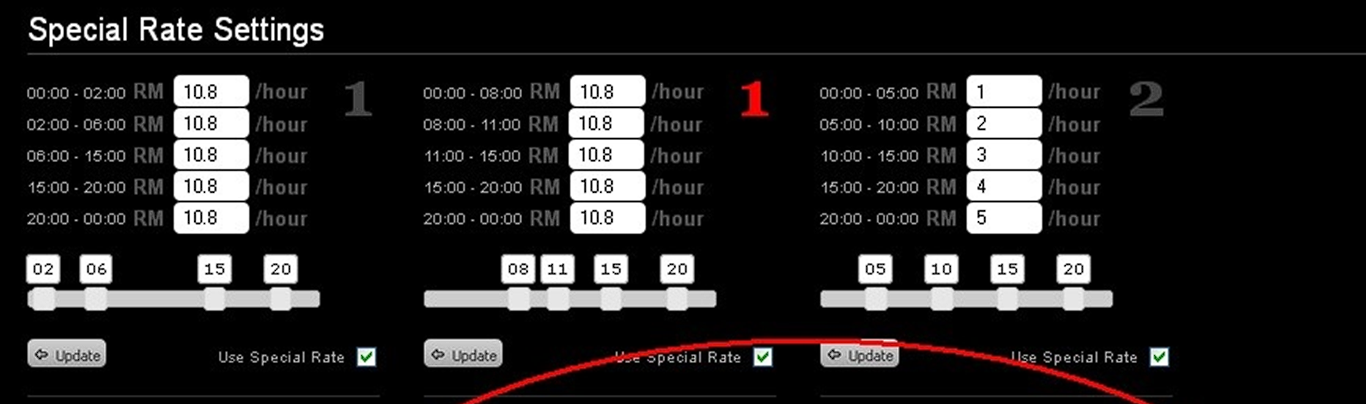
10.6. Special Rate Settings: Rate (Special Rate Settings)
- Key in the rate per hour for each period.
- Remember to tick the square box beside the “Update” button.
- And then, click “Update” button to save this setting.
Effect: (Table 3)
- 00:00 - 05:00 = RM 1 / hour
- 05:00 - 10:00 = RM 2 / hour
- 10:00 - 15:00 = RM 3 / hour
- 15:00 - 20:00 = RM 4 / hour
- 20:00 - 00:00 = RM 5 / hour
User start game on 23:30:00 and checkout on 00:30:00.
The total game charges = RM 5 x 0.5 hour + RM 1 x 0.5 hour = RM 3
Note: The red color of table’s number represents as Fixed Rate on SATURDAY TO SUNDAY and the grey color of table’s number represents as Fixed Rate on MONDAY TO FRIDAY.
 |