
facial_recognition_access
This is an old revision of the document!
Table of Contents
Facial Recognition Access
1. Introduction
This guide outlines a detailed process for using facial recognition in a manual user system to enhance security, streamline identity verification, and control access. It explains how biometric algorithms capture and match facial features to stored data, ensuring only authorized access. Users will learn key operational steps, hardware needs, and safety considerations for effective system use.
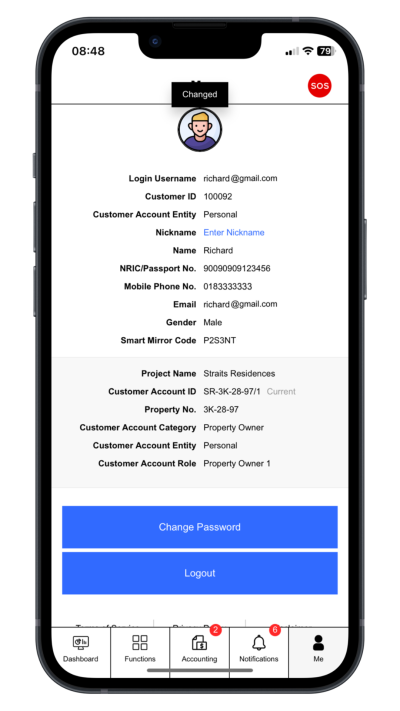
Step 1: Go to Profile Page
Click “Face Recognition Acces”.
 |
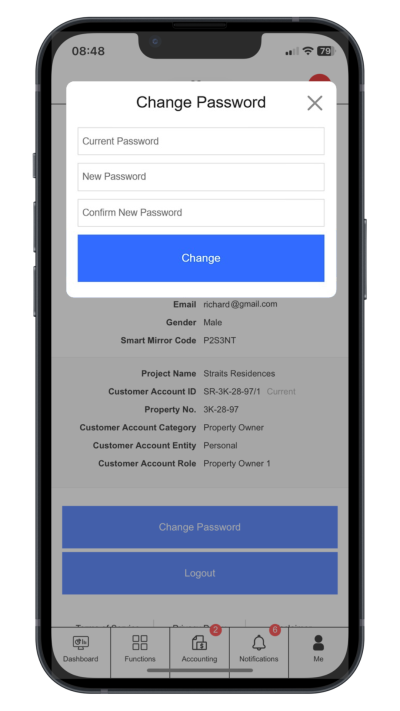
Step 2: Change Login Password
Click “Change Password”. Enter current password, new password and comfirm new password
 |
facial_recognition_access.1747208571.txt.gz · Last modified: by jimmy