
employees
This is an old revision of the document!
Table of Contents
Employees
1. Introduction
2. Employees
2.1 Add New Employee
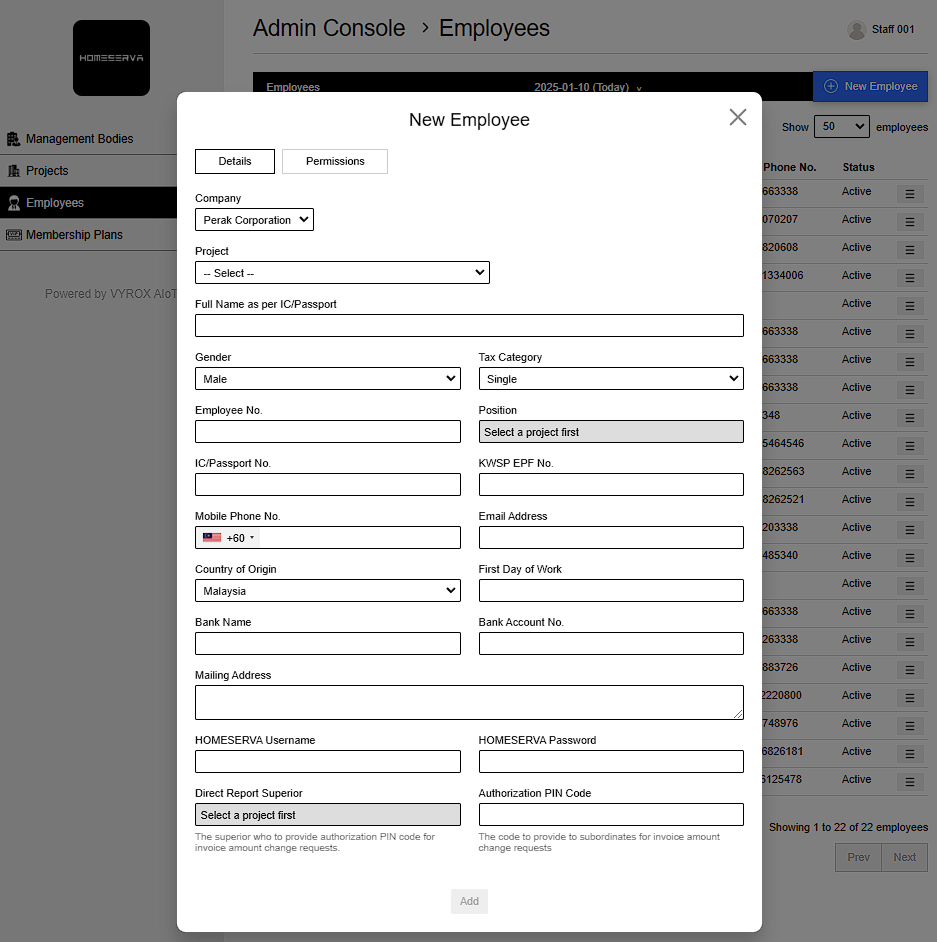
Go to Profile > Admin Console > Employees > New Employee > Fill in details > Add
Details include:
- Company
- Project
- Full Name as per IC/Passport
- Gender
- Tax Category
- Employee No.
- Position
- IC/Passport No.
- KWSP EPF No.
- Mobile Phone No.
- Email Address
- Country of Origin
- First Day of Work
- Bank Name
- Bank Account No.
- Mailing Address
- HOMESERVA Username
- HOMESERVA Password
- Direct Report Superior
- Select a project first (The superior who to provide authorization PIN code for invoice amount change requests.
- Authorization PIN Code (The code to provide to subordinates for invoice amount change requests)
- Select Permisisons
 |
employees.1736472008.txt.gz · Last modified: by yong