Snooker King · Snooker King AIoT Lighting & Billing System
10. Settings Snooker Table Rate
VYROX Wiki · Updated 3 March 2025 · https://www.vyrox.com/wiki/settings-table-rate
10.1. Packages settings: Setting up countdown timer to turn off lights automatically
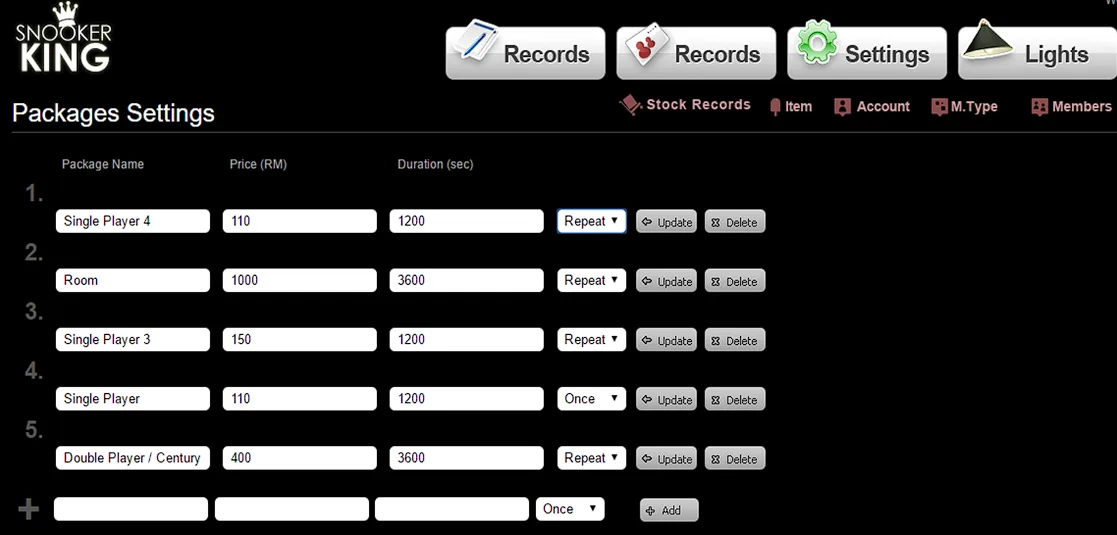
Key in textbox of Item, Price and Duration as well as select Once or Repeat option
Item: Name of the package
Price: Total price for the package
Duration: Total duration in seconds for the package
Once - Turn off lights automatically after countdown is finished
Repeated - After 1st time countdown is finished, it will automatically jump to 2nd, 3rd, 4th, etc. countdown until you click “STOP” button on checkout panel to turn off lights.
Remember to click “Add” button to add the package.
Effect:
Sample:
Situation 1: Single Player 4 Package
When user selects this option, customer is charged RM 110 for 20 minutes (1200 seconds). But it will start a new game after every 1200 seconds.
Situation 2: Room Package
When user selects this option, customer is charged RM 1000 for 1 hour (3600 seconds). But it will start a new game after every 3600 seconds.
Situation 3: Single Player 3 Package
When user selects this option, customer is charged RM 150 for 20 minutes (1200 seconds). But it will start a new game after every 1200 seconds.
Situation 4: Single Player Package
When user selects this option, customer is charged RM 110 for 20 minutes (1200 seconds). Our system turns off lights automatically after 1200 seconds.
Situation 5: Double Player/ Century Package
When user selects this option, customer is charged RM 400 for 1 hour (3600 seconds). But it will start a new game after every 3600 seconds.
10.2. Default Packages Settings: Setting up default package selection
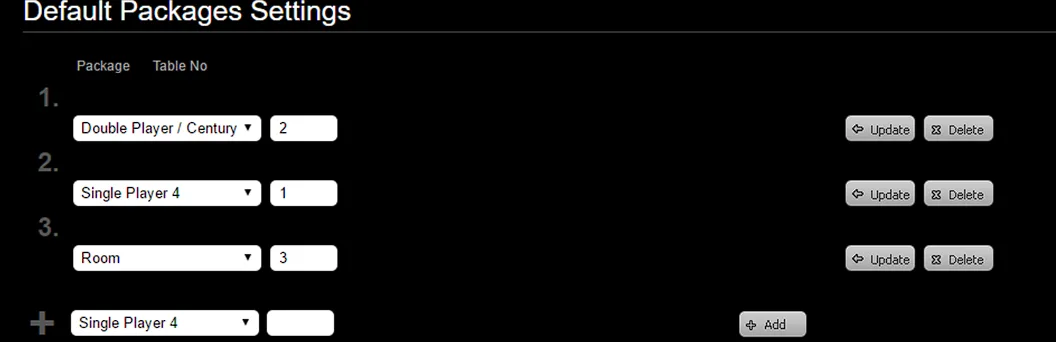
Select package option and key in table number.
Remember to click “Add” button to add the default package.
Effect: Back-end
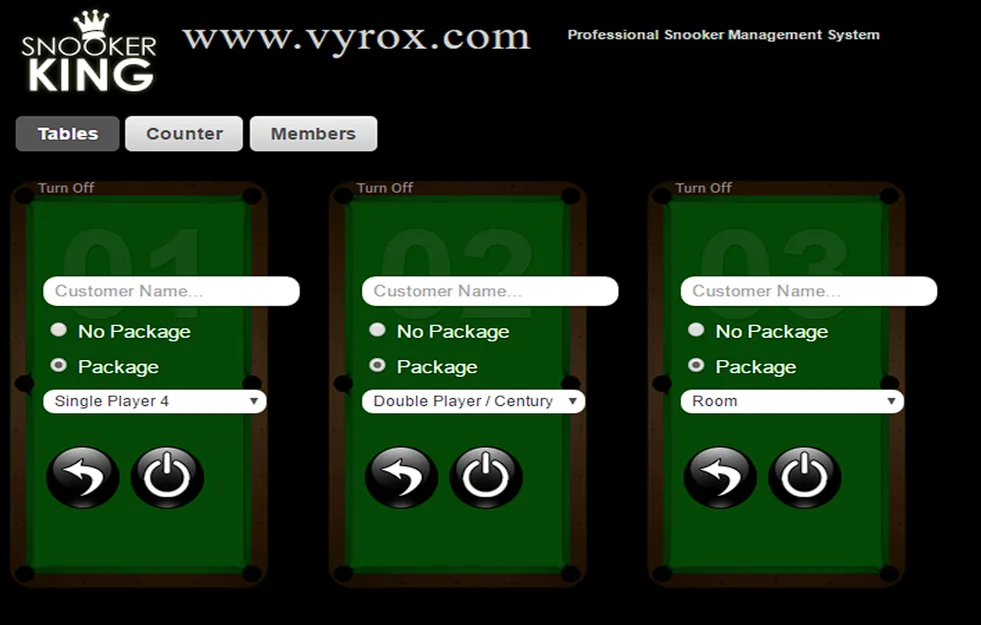
Effect: Front-end
Package Single Player 4 is automatically selected for table 1.
Package Double Player/Century is automatically selected for table 2.
Package Room is automatically selected for table 3.
10.3. Rate Settings: Setting up free of charge for all tables
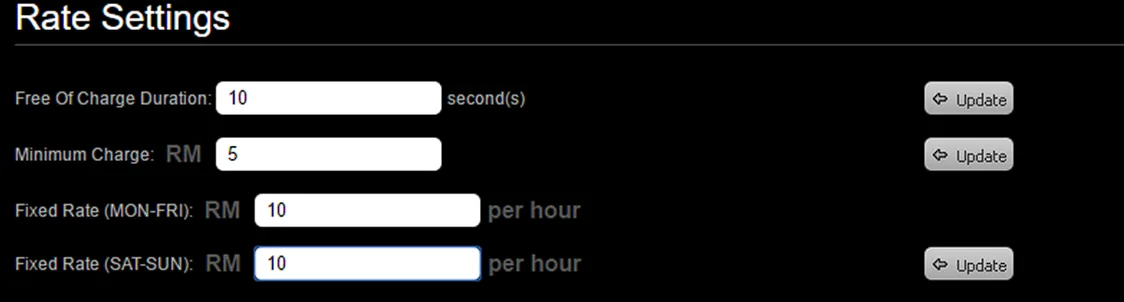
Key in duration (seconds) in textbox of Free of Charge Duration.
Remember to click “Update” button to save this setting.
Effect:
When user put 10 seconds in textbox, the charges for every game start charging after 10 seconds
Recommend to put 0 seconds.
10.4. Rate Settings: Setting up minimum charge on all tables
Key in the rate in textbox of Minimum Charge.
Remember to click “Update” button to save this setting.
Effect:
When user put RM 5.00 in textbox, all games with charges less than RM 5.00 will automatically checkout as RM 5.00. Recommend to put 0 seconds.
= 10.5. Rate Settings: Setting up fixed rate for all tables
=
Key in rate in textbox of Fixed Rate.
Remember to click “Update” button to save this setting.
Effect:
When user put RM 10 in textbox, all tables will be charged as RM 10/hour
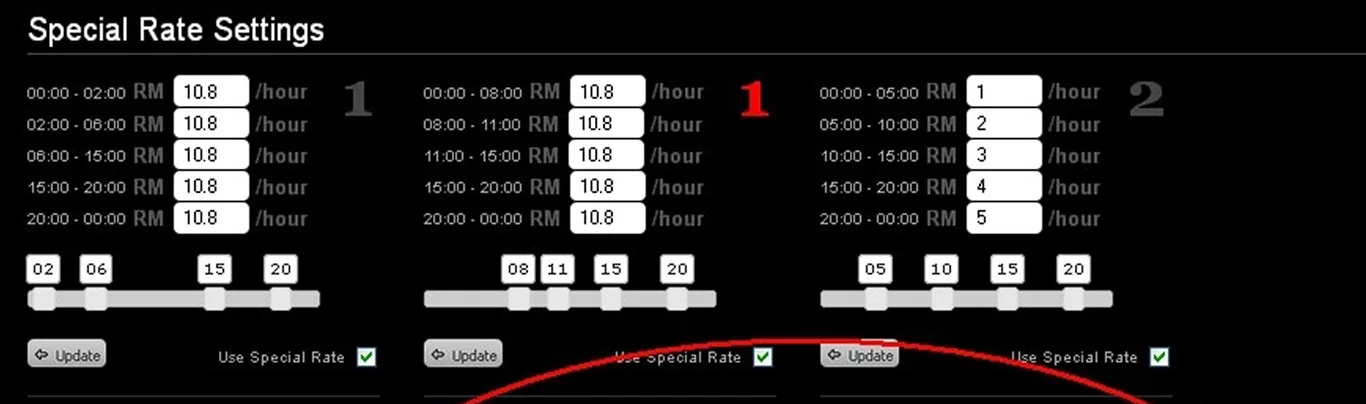
10.6. Special Rate Settings: Rate (Special Rate Settings)
Key in the rate per hour for each period.
Remember to tick the square box beside the “Update” button.
And then, click “Update” button to save this setting.
Effect: (Table 3)
00:00 - 05:00 = RM 1 / hour
05:00 - 10:00 = RM 2 / hour
10:00 - 15:00 = RM 3 / hour
15:00 - 20:00 = RM 4 / hour
20:00 - 00:00 = RM 5 / hour
User start game on 23:30:00 and checkout on 00:30:00.
The total game charges = RM 5 x 0.5 hour + RM 1 x 0.5 hour = RM 3
Note: The red color of table’s number represents as Fixed Rate on SATURDAY TO SUNDAY and the grey color of table’s number represents as Fixed Rate on MONDAY TO FRIDAY.